Which one?

Eidolon

Guru
Joined
Feb 19, 2007
Messages
491
Location
Bristol, UK
Gil
0
Which one should I use? The one I have now or this one:
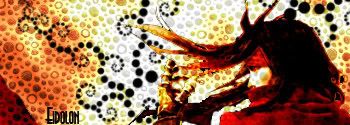
Vincent.jpg


???

*I am rubbish at FF sigs :P
 
I like the new one a lot more. The one you have now doesn't look right with those black spots, and they kinda throw the whole thing off

That's what I thought. TBH I was a bit lazy with the old one, and couldn't be bothered to do a background and so just added them.

Do you think on the new one the yellow spots are too sharp?
 
Mmmm I've been looking at ways to make them less sharp, but blurring just looks wrong, and editing the layers isn't working either. Anyway I'm working on it.
 
Hmmm...am I missing something, or have you exceeded you Photobucket bandwidth and the image is missing...?
 
Hmmm...am I missing something, or have you exceeded you Photobucket bandwidth and the image is missing...?

Really? Pooley can see it but for some reason you and Sakura can't...

I can see it aswell...

weird - I'll try imageshack

*EDIT*
Here are the imageshack links:
vincentyx7.jpg

vincentvalentinejw6.jpg
 
Last edited:
I have seen the second one , somewhere .
But the first rox
Specially the part Vin is coming from light .
Just try to remove dissolve a little and see how does it work
 
I have seen the second one , somewhere .
But the first rox
Specially the part Vin is coming from light .
Just try to remove dissolve a little and see how does it work

My sig maybe?

Anyway - I am trying to find a method to remove the dissolving a little, but what I have tried so far just makes it look bad. It's annoying I've used so many "Apply Images" so if I want to change one thing I almost have to remake the whole sig again.
 
You van merge some layers together.
FILTER > BLUR > GAUSSIAN BLUR , can remove the dissolve ..
Try it ;)
 
You van merge some layers together.
FILTER > BLUR > GAUSSIAN BLUR , can remove the dissolve ..
Try it ;)

I believe I mentioned I already tried a Gaussian blur...and erasing the parts I didn't want blurred. It really didn't turn out well. :P

However I did have another go at using the blur tool - on a layer of white on overlay and low fill over the top, and that came out like this:
vincentiq0.jpg


Which I think is alright, but still not how I'd really like it to be.

Next I think I'll try a gentle smudge tool.

Cheers for the help.
 
Actually you did not mention it.
Not even blur
........
Anyway , you're welcome
 
Mmmm I've been looking at ways to make them less sharp, but blurring just looks wrong, and editing the layers isn't working either. Anyway I'm working on it.

^^

Anyway - what do you think of the new one? I'm not sure I prefer it to the old one with the sharp dots...
 
Yeah , too much better .
An important point in making sigs is that no one realize how did you create it .
What tricks did you use and etc.
I mean , no one be able to create one same as you .


Nice work.
 
Back
Top